|
Get extra security for your trading password without going the extra mile.
Get SecurID.
The rise of online financial trading and transaction has also seen the rising risks attached with it. To enable safer online transactions for you, JustTrade offers SecurID - a world-class, pocket-friendly password security device, which generates a new password every minute! So, no one can ever guess your password or hack into your JustTrade account. With "extra security" for your password, you can now trade with "extra peace of mind" on JustTrade.
Frequently Asked Questions
1. What is SecurID?
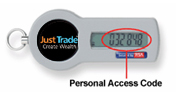
Digital SecurID is a key-chain sized online security device which provides you with a personal passcode every time you log-in to your JustTrade online trading account. This passcode changes every 60 seconds to keep your transactions extra safe.
2. How does it work?
Passwords are the most commonly used authentication form. But passwords fall an easy prey in the hands of hackers, phishing attacks and other spyware. A strong authentication needs a strong second layer of protection which cannot be easily compromised. SecureID provides this second layer and provides you a unique authentication code which can be used with your UserId and Password and this authentication code changes randomly, every 60 seconds. So, your password is always out of reach of hackers.
3. How do you benefit from SecurID?
SecurID is designed to be user-friendly, handy and to withstand rough conditions. Its superior technology ensures that any unauthorized access into your account is practically impossible.
4. How much does it cost?
The amount of risks involved in online transactions take a heavy toll on your peace of mind. Comparatively, SecurID is available at a very nominal price. Just for Rs.750/-, you get a protection for 5 years and get your online investments secured. This effectively means you are paying Rs.12 per month for a safe and secure trading.
5. How can you order this device?
To order SecurID, Just Trade customers can login to justtrade.com/securID.com and register online. The product will be send to your address within 7 days.
6. How do I login my SecurID device?
Follow these simple steps to login your SecurID.
a) Enter your username
b) Your first time PASSWORD is first four digits of your PAN Number for example XXXX followed by DDMMYY of your date of birth (in DDMMYY format). For instance, if your PAN Number is AAAAA12345A and date of birth is date birth is 10th October 1965; your password would be "AAAA101065". This password is case sensitive and should be entered in uppercase.
c) Enter your RSA Token Number displaying in the Token device provided to you which is keep on changing in every 60 seconds
d) Click on the Login button
7. Do I always need the Digital SecurID to log in to JustTrade?
Yes, you will need your JustTrade Customer ID, current password and the six-digit access code generated by the device every time you log in.
8. Can I log on if I dont have the device with me?
Once you have activated the device, you will need to use the six-digit code every time you log on. In case you have lost or misplaced the device, please call our Client Care Executive, Toll Free 1800-110-900 (for MTNL & BSNL subscribers) 1800-3000-9000 (for all other subscribers) to report and acquire a temporary password. Once you get back to normal log in, you further cant access security token provided earlier. To use it again, you will be issued a new token with a charge of Rs.750 for 5 years.
9. Is my trading account absolutely secure with the Digital SecurID?
Yes, we use state-of-the-art encryption methods to protect sensitive data. This device provides an additional layer of security to your online transactions. With a new passcode generated every time you login to JustTrade, theres little chance for hackers to find out your password at any given point of time.
10. What if I lose or misplace this device?
Call our Client Care Executive, Toll Free 1800-110-900 (for MTNL & BSNL subscribers) 1800-3000-9000 (for all other subscribers) to check on the process for applying for a replacement device.
11. Will the device get damaged with use?
The device has undergone rigorous testing for temperature, humidity, altitude, vibration, shock, drop/tumble, electrostatic discharge, and ruggedness. In case the device does not function well, please report this to our Client Care Executive, Toll Free 1800-110-9000 (for MTNL & BSNL subscribers) 1800-3000-9000 (for all other subscribers) to acquire a temporary password
12. Can I deactivate the use of this device?
Yes you can deactivate the use of device by intimating Call Centre executive Toll Free 1800-110-900 (for MTNL & BSNL subscribers) 1800-3000-9000 (for all other subscribers and asking to get your Normal Log in on. But the one time cost is nonrefundable.
You want to learn more about SecurID before ordering.
View Demo
|